Last updated
Reports
Reports are built from the same local index as the editor suggestions. Open them from the Core Plus Links admin.
Definitions
- Orphan page — an indexed page with no internal links pointing to it.
- Underlinked page — an indexed page with fewer inbound internal links than its importance calls for.
Both lists only include content that is in the index. They are structural reports, not ranking forecasts.
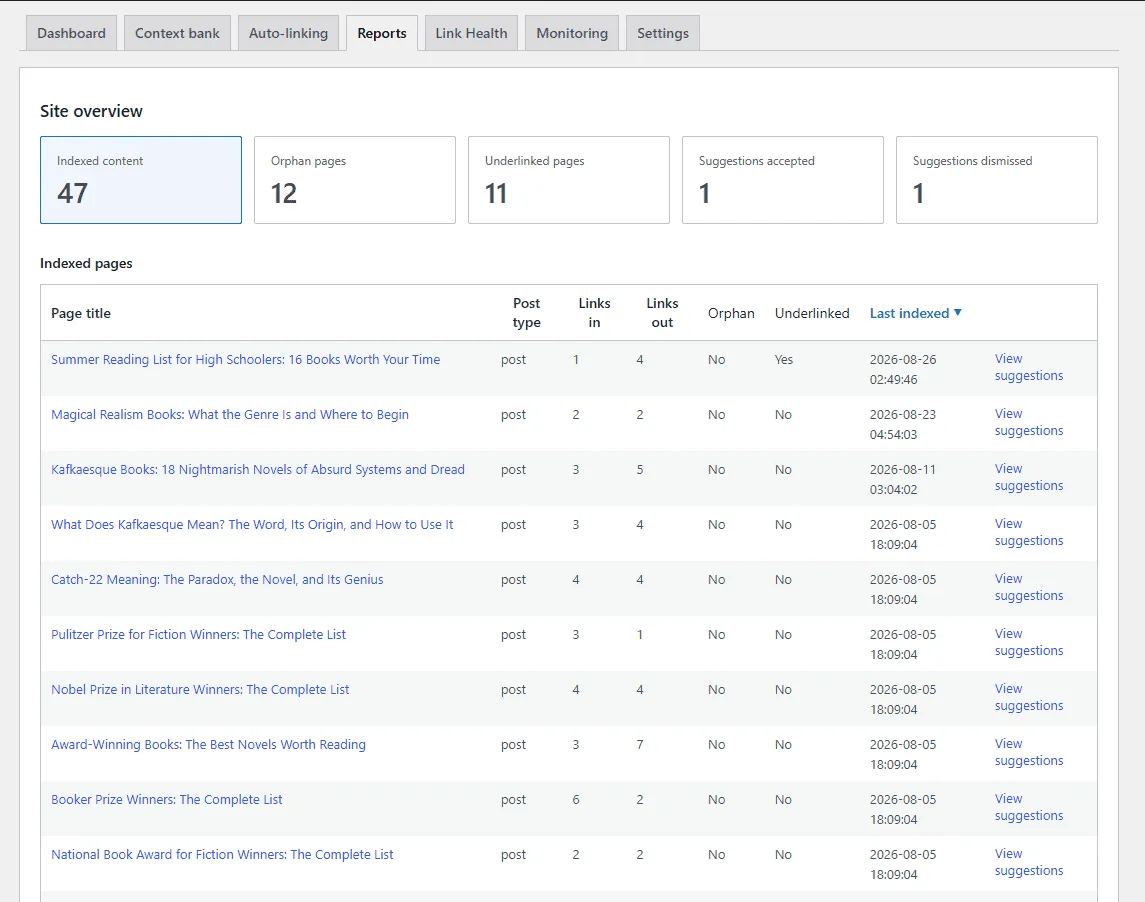
Sorting and pagination
Report columns sort ascending and descending across the entire result set, not only the rows on the current page. Pagination reaches every row.
Suggestion history
The Suggestions accepted and Suggestions dismissed cards switch the table to the suggestions themselves: source page, target page, anchor text, status, and date. Use them to audit what was inserted or set aside without opening each post.
How to read them
Use the counts as a prioritisation cue, then open the table. Work from pages that matter for your information architecture. The reports do not assign urgency; you decide which gaps to close first.
Practical workflow
- Open an orphan or underlinked report.
- Pick a target page you want linked.
- Open a related published post or page in the block editor.
- Use the editor sidebar to insert a link to that target.
Repeat. The reports tell you where gaps are; the sidebar tells you which source posts are good candidates.
Honest limit
The reports show structural gaps in your internal linking. They do not predict what closing those gaps will do to search rankings.
Broken internal links (unpublished, trashed, or missing targets) are a separate admin screen: Link Health. They are not mixed into the orphan or underlinked tables.
Related: Context bank, How ranking works, Link Health, Features.