Last updated
Installation
Requirements
Before you install, confirm:
- WordPress 6.6 or later (tested up to 7.1)
- PHP 7.4 or later
- The block editor (Gutenberg). Classic editor is not supported.
- Per-site activation. Network activation on multisite is not supported.
These match the plugin headers. If they ever disagree, the plugin readme.txt is right.
Install from WordPress.org
- In WordPress admin, go to Plugins → Add New, search for Core Plus Links, and click Install Now.
- Activate Core Plus Links.
- After activation, Core Plus Links queues a full-site index job. A setup notice appears (“Core Plus Links is building your content index…”). When indexing finishes, you will see “Core Plus Links finished building your content index.”
- Open a post or page in the block editor and use the Core Plus Links sidebar for suggested links.
- In Core Plus Links admin, use Auto-linking to add keyword rules and review matches, Change history to review and undo inserted links, and Link Health to scan for broken internal links. Settings holds Auto-link scope — which pages bulk apply may edit.
The WordPress.org listing is the primary install path.
Install from ZIP
A ZIP remains available from the download page if you prefer not to use the directory.
- Download the Free ZIP from the download page.
- In wp-admin go to Plugins → Add New → Upload Plugin.
- Choose the ZIP and install.
- Activate on a single site — not network-wide.
Then follow the index and admin steps above.
Run the first index
After activation, Core Plus Links queues the first index. Open Core Plus Links in the admin to watch progress.
Indexing runs as a background job, not during page loads. On a site with a few hundred published posts and pages, the first run finishes in minutes. Larger sites take longer; the job continues in the background while you work elsewhere in the admin.
On quiet sites, apply, scan, and reindex jobs also drain in the admin request. Leftover index batches keep
moving on each cron tick. If the site depends on WP-Cron and traffic is low, you can still process the
queue with WP-CLI: wp core-plus-links run-queue.
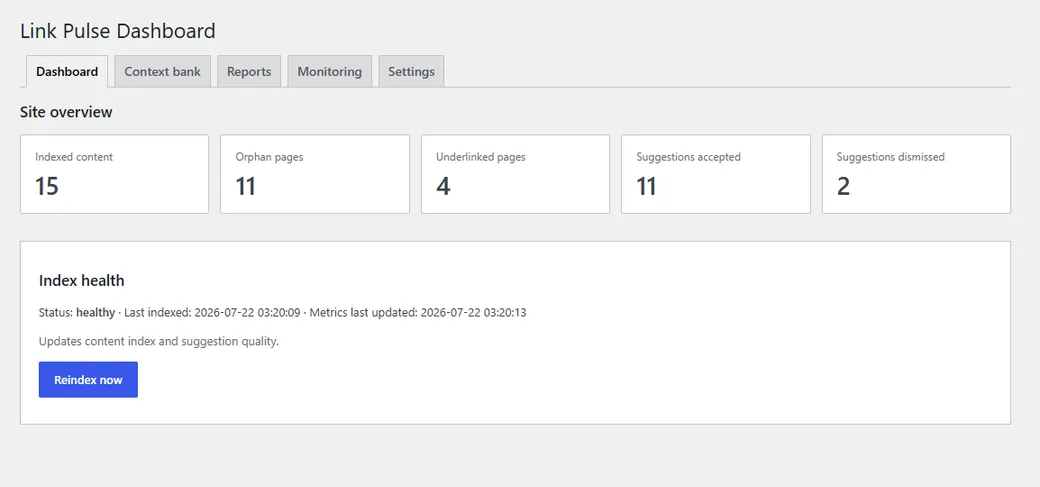
Job status updates on the dashboard while the index runs. When it finishes, the index is ready for the editor sidebar, Auto-linking, Link Health, and reports.
Upgrading
After you update Core Plus Links, plugin tables migrate on first load. Applying or undoing an auto-link writes post content and creates a WordPress revision.
The plugin also recalculates link data once in the background. Link counts and the orphan and underlinked reports may look out of date until that finishes — several minutes on a large site.
That is deliberate: showing stale figures plainly is better than showing zeros that look real. No action is required while the recalculation runs. When it completes, counts and reports reflect the stored link graph again.
What is not supported
- Classic editor — suggestions appear only in the block editor.
- Network activation — per-site only; network activation is refused with a notice.
- Custom post types on Free — Free indexes
postandpageonly. CPT support is Upcoming in Pro. - Custom field indexing on Free — custom fields are Upcoming in Pro.
- External HTTP link checking — Free Link Health is internal only. External checking is Upcoming in Pro.
- Scheduled auto-link apply — Free applies only after you confirm. Scheduled apply is Upcoming in Pro.
Next: Quick start — first inserted link — or Auto-linking, Change history, and Link Health once the index has finished.