6 min read
Introducing Core+ Links: scored internal link suggestions
Internal linking is added by memory, and only in one direction.
You draft a new post, recall an older one that fits, and link to it. This works going forward, not backward: a post published in March is never linked from anything written in April, because April’s writing is not informed by March’s archive. Repeated across two years and a few hundred posts, the result is a site where some pages are linked from a dozen places and others from none, with no practical way to tell which is which.
Auditing that by hand means holding an entire site in memory at once. Doing it once is possible. Auditing it by hand a second time is not realistic, and so it is left undone.
Core+ Links is a free WordPress plugin that performs that audit continuously. It indexes published content, scores every possible link target against the post currently being edited, and returns the ranked results in the block editor sidebar, together with the reason each one ranked where it did.
What it does
Three things, in order.
It indexes your content. Titles, excerpts, headings, cleaned body text, taxonomy terms, slugs, parent/child relationships, and existing internal link counts. All of it is stored in tables in your own WordPress database. Free indexes posts and pages only.
It scores candidates while you write. Opening a post in the block editor opens the Core Plus Links sidebar, which ranks the most relevant targets from your own content. Each result shows a match score; expanding it shows the signals that produced that score.
You insert with one click. Confirm or edit the suggested anchor text, then insert. Dismissed suggestions stay dismissed — they do not reappear later with a different score.
The scoring, in full
Every candidate is scored across eight signals, each normalised to a 0–1 range and combined into a single weighted sum. This is the mechanism most internal-linking tools decline to disclose.
| Signal | Weight | What it measures |
|---|---|---|
| Taxonomy overlap | 0.30 | Shared categories and tags |
| Title overlap | 0.20 | Term overlap between the two titles |
| Body keyword overlap | 0.15 | Term overlap across cleaned body text |
| Heading overlap | 0.10 | Term overlap across headings, tracked separately from body |
| Link graph relevance | 0.10 | How the candidate sits in your existing link structure |
| Excerpt overlap | 0.05 | Term overlap in excerpts |
| Custom field overlap | 0.05 | Overlap across indexed custom fields (Pro Upcoming; dropped on Free) |
| Priority score | 0.05 | Manual priority you have set on a page |
The weights sum to exactly 1.00. There is no hidden ninth signal and no adjustment layer applied on top of the arithmetic.
Why taxonomy outweighs the title
This weighting is the one figure in the table that requires explanation.
Shared words are weak evidence that two posts are related. A post called “The Best Books of 2025” and a post called “Best Camera Bags” share the word “best” and nothing else that matters. Weighting title overlap heavily produces exactly this failure: results that are lexically similar and topically unrelated. This is the common failure mode of keyword-matching link plugins.
Shared taxonomy is stronger evidence. Filing two posts under the same category is a judgement that they belong together — and that judgement carries more information than word frequency.
Weighting title and heading too heavily produces exactly this failure. Taxonomy therefore leads at 0.30; title and body carry the remaining textual weight; heading and excerpt contribute at lower weights. On Free, custom field overlap is dropped because Free does not index custom fields.
What happens when a signal does not apply
If a site does not use categories and tags, scoring every candidate against taxonomy would permanently cap what any suggestion could achieve. Signals a site does not use are dropped from the calculation entirely, rather than reducing every score by a fixed amount.
The distinction: this protects a site that does not use a signal — not an individual post that lacks it. If a site does use taxonomy and a particular target has none, that target takes a real zero, because redistributing its weight onto title matching would reward exactly the shallow word collisions the weighting was designed to avoid.
A penalty is applied after the weighted sum: a page that is already heavily linked scores lower than the same page would with fewer inbound links. The penalty directs suggestions toward pages that still need links, rather than adding further weight to pages that already have them.
The full model, including normalisation and the penalty thresholds, is documented in how ranking works.
Reproducible, and why that matters
Same content, same settings, same results — every time.
It is the difference between a tool that can be used and one that must be managed. A suggestion rejected on Monday does not return on Thursday with a different score and a different position. When a ranking looks wrong, the breakdown identifies the signal responsible, and the cause can be corrected directly — commonly a tag applied more broadly than intended.
Nothing is inferred. There is no model, no external call, and nothing to take on faith.
Finding what you would not
Two reports, both built from the same index.
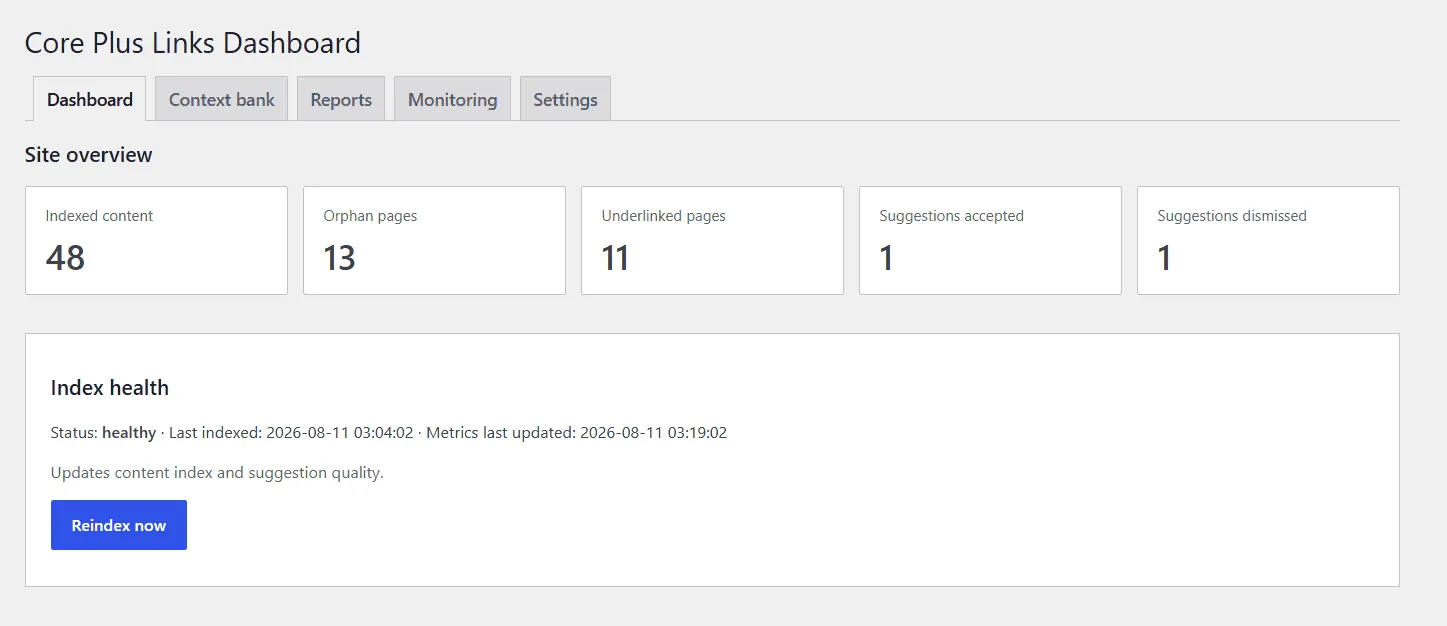
The dashboard overview: indexed content, orphan and underlinked counts, and index health at a glance.
Orphan pages are indexed pages with no internal links pointing to them at all. Underlinked pages have fewer inbound links than their importance calls for.
Exclude utility pages before reading these reports. A privacy policy, terms page, and cookie notice are orphaned by design and require no action. Exclusion in Core+ Links is total and bidirectional: an excluded page is never offered as a target, receives no suggestions when edited, and does not appear in the reports at all.
The reports identify structural gaps. They do not predict the effect of closing those gaps on search rankings — no tool can verify that outcome.
What runs where
Everything, on your own server.
Indexing and ranking run in PHP against your own database. Core Plus Links Free sends no content anywhere, requires no API key, requires no account, and has no telemetry.
Core+ Links Pro (Upcoming) adds optional AI-assisted matching using a provider key you supply. This is turned on deliberately; once enabled, content is sent to the provider chosen, under that provider’s terms. The feature is off by default. Stating this exception is what makes the privacy claim for Free credible — full detail is on the privacy page.
What is in the free version
The whole deterministic product, not a preview of it.
Posts and pages indexed · suggestions in the block editor · inbound and outbound link listings · editable anchor text before insert · one-click insert · dismissals that persist · a context bank for taxonomies and exclusions · suggested exclusions for utility pages (you review; never auto-applied) · orphan and underlinked reports · Auto-linking (keyword rules, review, apply selected, per-row undo) · Link Health for unpublished, trashed, or missing internal targets · background, manual, and scheduled reindexing · logs and index health monitoring.
Free indexes posts and pages only. Custom post types and custom field indexing are Upcoming in Pro. This release supports the block editor only. Per-site activation is supported; network activation on multisite is not, and the plugin states this explicitly rather than failing silently.
Free is not a time-limited trial. There is no feature expiry, and no plan to move current features out of Free to sell Pro.
Installing it
Core Plus Links requires WordPress 6.6 or later and PHP 7.4 or later. Install it from WordPress.org, or download the ZIP, run the first index, and open any post. Once indexing finishes, the sidebar shows ranked suggestions for that post. Auto-linking and Link Health are in the Core Plus Links admin.
For more detail on the mechanism, the features page covers indexing scope, the sidebar, and the reports.
Read the ranking model
The eight signals, renormalisation, and the overlinked penalty — in the docs.